If one of Riley's sales plays almost fits your shop but the wording is off, you don't have to turn it off. The Sales Tactics editor lets you rewrite any play's script word for word, and your edited copy applies to your shop only - every other shop keeps the global default.
When to use the Sales Tactics editor
The Gambit library (Tim Playbook) controls whether a play fires and how assertively. The Sales Tactics editor controls what Riley actually says when the play fires. Reach for it when:
- A play references something your shop doesn't offer, and you want to swap in what you do offer.
- The phrasing doesn't sound like your shop's voice.
- You want to add a brand-new play of your own from scratch.
Open the editor
- Go to Shop config and open the Tim playbook tab.
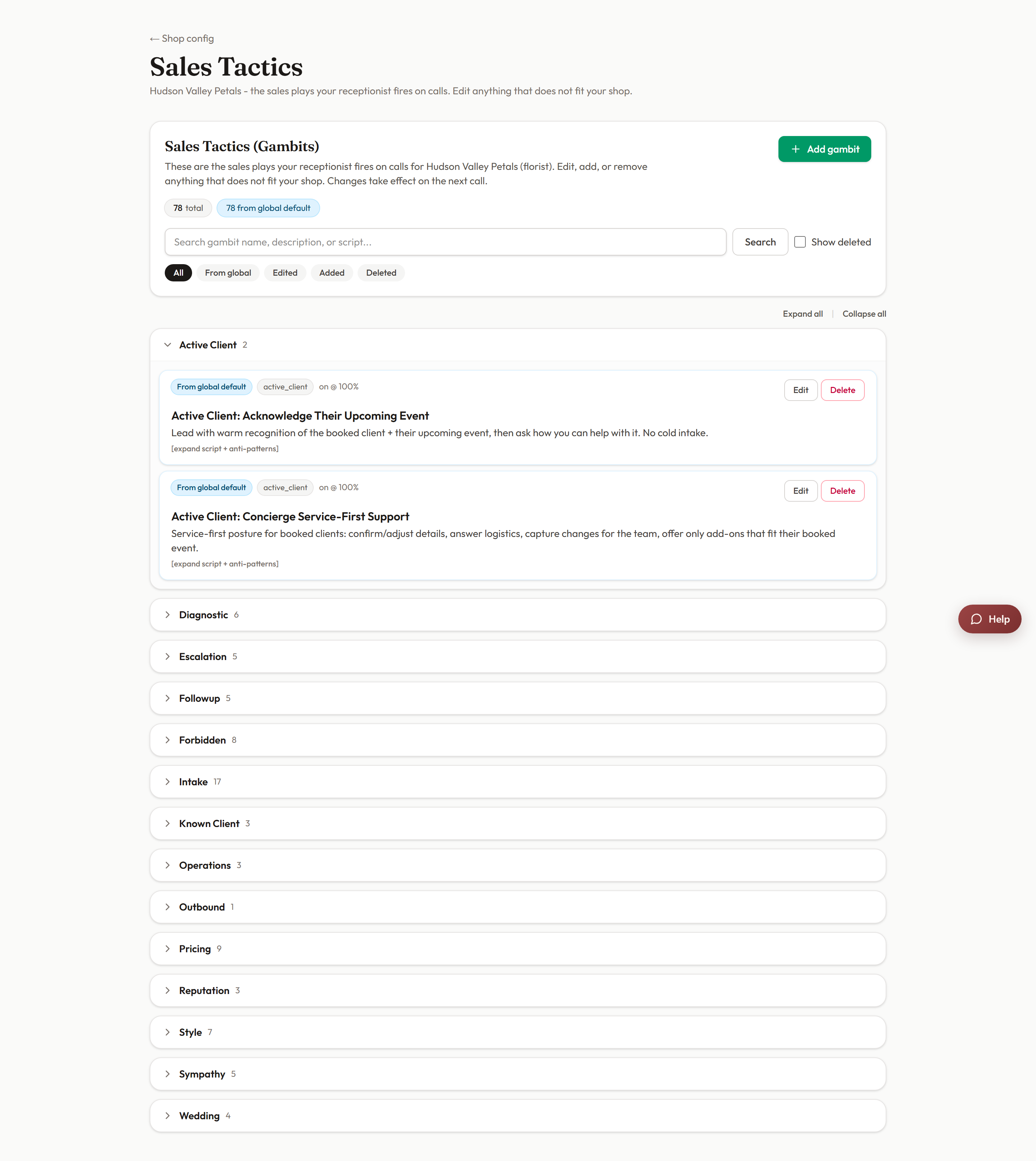
- Follow the link into the Sales Tactics script editor. You'll land on a searchable list of every play available to your shop.
Find and edit a play
- Use the search box at the top. It matches against the play's name, its description, and the script text itself - so if you remember a phrase Riley said on a call, search for that phrase directly.
- Click the play to open the Edit gambit modal.
- Rewrite the script the way you want Riley to say it.
- Click Save changes. From now on, your version overrides the global default for your shop only.
Add or delete a play
- Add gambit opens a modal where you give the play an internal name and write its script. Added plays belong to your shop alone.
- Delete gambit removes a play from your shop's playbook.
What the status chips mean
Every play in the list carries a chip so you always know where its current text comes from:
- Default: the untouched global script.
- Edited: you rewrote it, and your version is live for your shop.
- Added: a play you created yourself.
- Deleted: a play you removed.
- From global default: the text is inherited from the shared library.
Getting back
Use the Back to Shop config link at the top of the editor to return to your dashboard.
Tip: after rewriting a script, run a mystery shop on a scenario that should trigger that play. You'll hear your new wording in action and get it graded at the same time.
Still stuck? Submit a ticket from this help center and we'll take it from there.
Was this article helpful?
That’s Great!
Thank you for your feedback
Sorry! We couldn't be helpful
Thank you for your feedback
Feedback sent
We appreciate your effort and will try to fix the article