Every call Riley handles gets a full record you can open any time: the audio recording, the word-for-word transcript, and action cards showing what Riley actually did on the call. This article walks you through the call detail page and what each part means.
Open a call
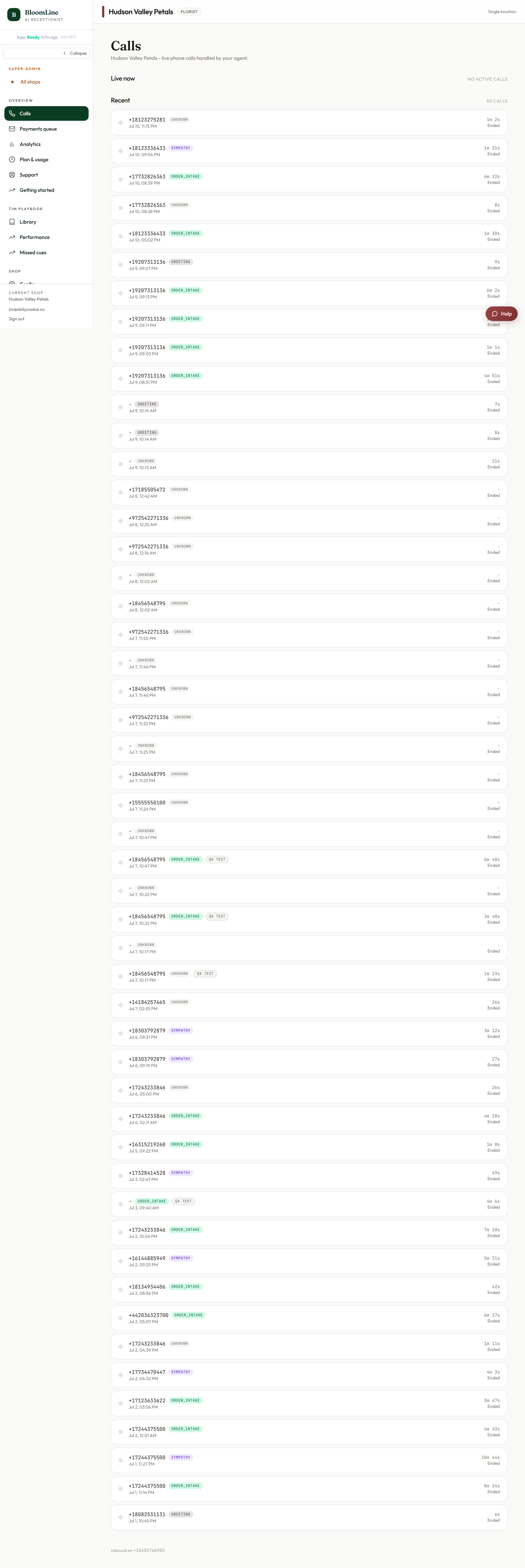
- Go to Calls in the sidebar (https://km-florist-receptionist.vercel.app/dashboard/calls).
- Click the call you want to review. Each row shows the intent, status, and duration so you can find the right one quickly.
Listen to and download the recording
At the top of the call detail page you will find an audio player, plus a Download link if you want to keep a copy of the file.
Next to the recording you will see a badge reading either Archived or Retell CDN. Here is what that means: recordings start out hosted on our voice provider's CDN (Retell), and those copies expire after a while. A daily archive job mirrors recordings to our own secure storage so they stay available. The badge simply tells you which copy you are listening to. If long-term access matters to you, the Recordings page lets you manage retention and lock specific recordings - see the article on call recordings and retention.
Read the transcript and action cards
Below the player, the transcript shows the whole conversation, turn by turn. Woven into it are action cards - markers of the concrete things Riley did during the call, so you can see not just what was said but what happened as a result. It is the quickest way to verify how an order, question, or request was handled.
What else lives on this page
The call detail page is also where you will find several tools covered in their own articles:
- Live takeover: while a call is in progress, type lines for Riley to speak verbatim.
- Callback: have Riley call the customer back with a script you choose.
- Quality rating: grade the call from Exemplar to Bad to feed fine-tuning.
- Mystery-shop score card: if the call was a mystery-shop test, a 12-point rubric score card appears here.
Getting back
Use the Back to all calls link to return to the list and pick the next call to review.
Still stuck? Submit a ticket from this help center and we'll take it from there.
Was this article helpful?
That’s Great!
Thank you for your feedback
Sorry! We couldn't be helpful
Thank you for your feedback
Feedback sent
We appreciate your effort and will try to fix the article