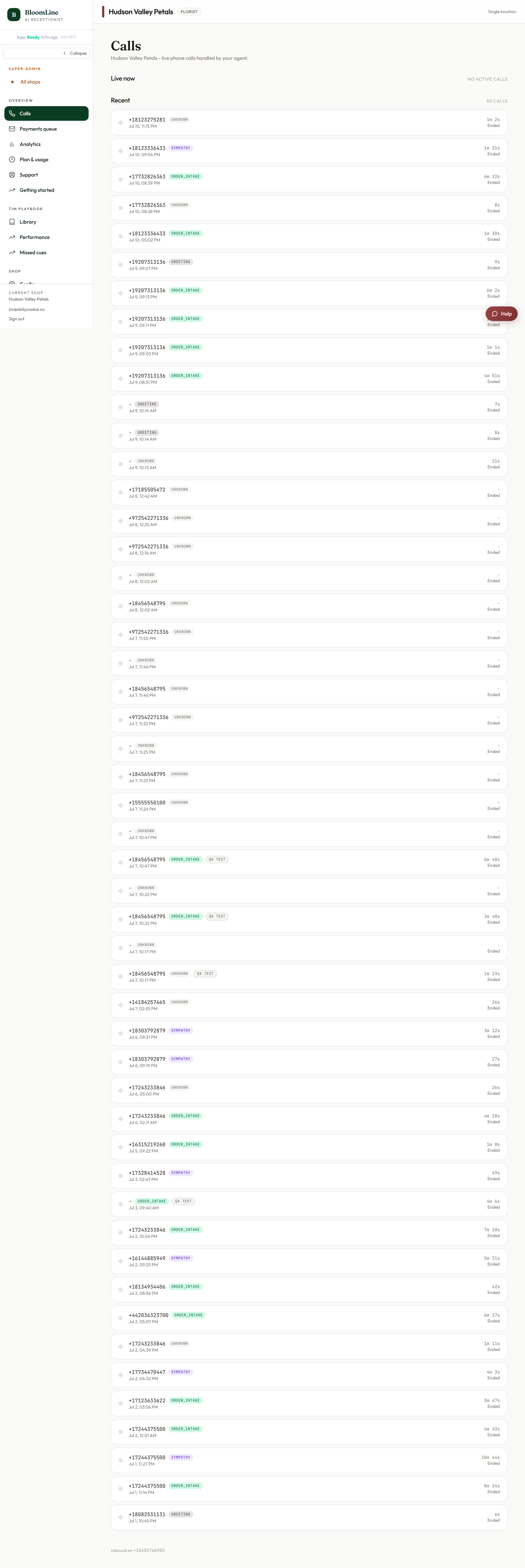
The Calls page is home base for your BloomLine dashboard: every call Riley answers for your shop lands here, and new calls appear at the top in real time while the page is open. It is the fastest way to see what your phone line is doing without ever picking up a handset.
Where to find it
Click Calls at the top of the sidebar, or go to https://km-florist-receptionist.vercel.app/dashboard/calls. Signing in and landing on the dashboard takes you here automatically - the dashboard index redirects straight to the Calls page.
What each call row tells you
The list shows your last 50 calls, newest first. Each row gives you three things at a glance:
- Intent: what the caller wanted - an order, a delivery question, a wedding consult, and so on.
- Status: how the call ended up.
- Duration: how long the call ran. Durations here are also what your usage-based billing is built on, so this column doubles as a quick usage check.
Click any row to open the full call detail, with the recording, transcript, and action cards for that call.
Live updates - no refresh needed
Keep the page open during a busy stretch (a holiday morning, for example) and calls appear as they happen. You do not need to reload the page - the list updates itself in real time while it is open.
The mystery-shop tag
Test calls placed by the mystery shopper carry a mystery-shop tag right on the row. That way you will never mistake a graded QA call for a real customer, and you can spot your test runs quickly when reviewing the list.
Your inbound number, always in view
At the bottom of the page you will find the inbound number footer - the BloomLine number your calls arrive on. Keep it handy when you are setting up call forwarding or want to place a quick test call from your own phone.
Seeing a nudge instead of calls?
If the page shows an onboard-a-shop nudge rather than a call list, your sign-in email is not linked to a shop yet. Follow the nudge to run the website-scan wizard and create your shop - once it exists, your calls start showing up here.
Still stuck? Submit a ticket from this help center and we'll take it from there.
Was this article helpful?
That’s Great!
Thank you for your feedback
Sorry! We couldn't be helpful
Thank you for your feedback
Feedback sent
We appreciate your effort and will try to fix the article