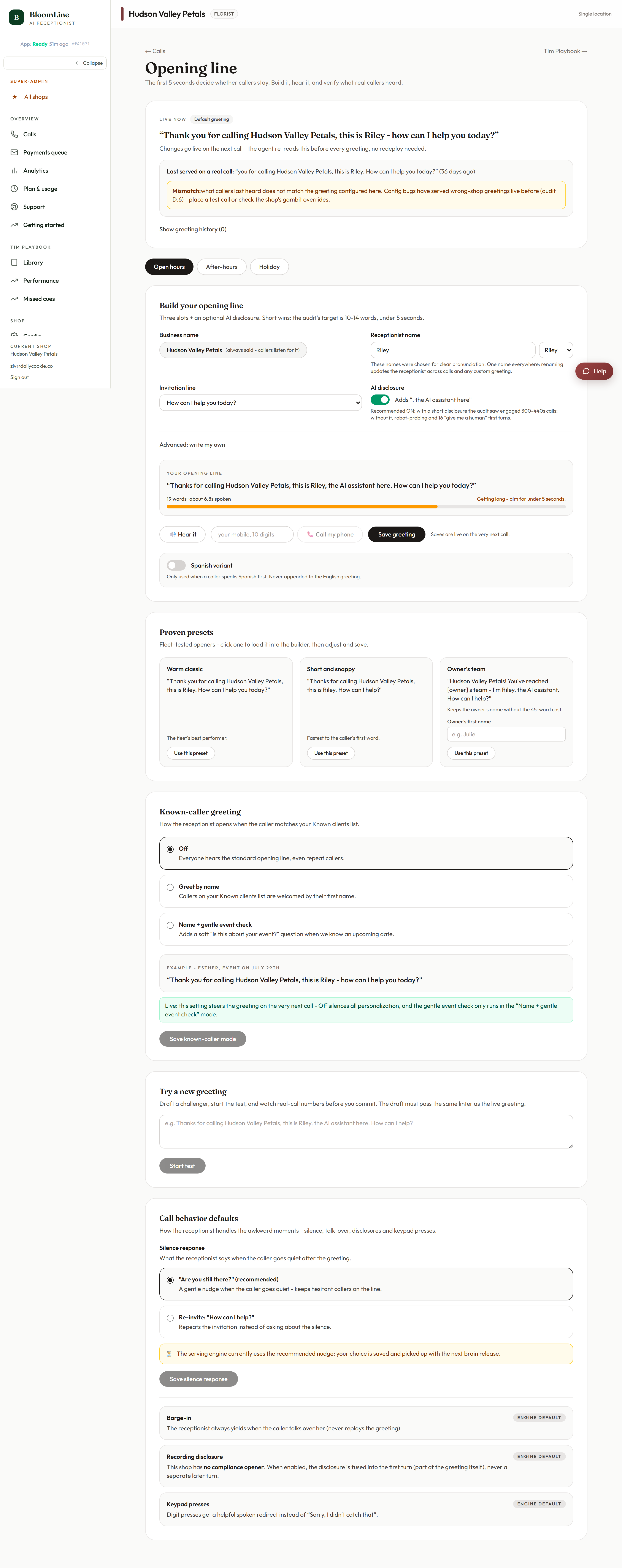
Beyond the greeting text itself, the Opening line studio has three behavior controls that shape the start of every call: what Riley says when a caller goes quiet, an A/B test to find a better greeting, and how known callers are welcomed. All three live at https://km-florist-receptionist.vercel.app/dashboard/greeting.
What Riley says when the line goes quiet
In the Call behavior defaults card, choose the silence response:
- "Are you still there?" - the recommended check-in. It confirms the caller is still on the line without repeating the pitch.
- Re-invite: "How can I help?" - restates the invitation instead. Useful when callers tend to pause because they are thinking about what to order.
Pick one and click Save.
A/B test a new greeting
Not sure whether a different opening line would convert better? Use the A/B test card:
- Write a variant greeting in the draft field.
- Click Try a new greeting to start the test. Calls are split between your current greeting and the variant.
- Check the A/B comparison on your Analytics page (https://km-florist-receptionist.vercel.app/dashboard/analytics) to see which one performs better before committing.
Greet your VIPs by name
The Known-caller greeting setting controls what happens when someone on your Known Clients list phones in:
- Off - everyone gets the standard greeting.
- Greet by name - "Hi Sarah, welcome back." A small touch that regulars notice.
- Name + gentle event check - greets by name and softly asks whether they are calling about an upcoming occasion.
Choose a mode and click Save. For this to work, the caller's number needs to be on your Known Clients list - add people at https://km-florist-receptionist.vercel.app/dashboard/shop?tab=known-clients (see "Recognize your VIP/repeat customers by phone number").
Everything goes live on the next call
Like the rest of the Opening line studio, each save takes effect immediately on the next inbound call. Place a test call from the Test call block on the same page to hear your changes.
Still stuck? Submit a ticket from this help center and we'll take it from there.
Was this article helpful?
That’s Great!
Thank you for your feedback
Sorry! We couldn't be helpful
Thank you for your feedback
Feedback sent
We appreciate your effort and will try to fix the article