You can hear Riley, BloomLine's AI phone receptionist, before you sign up for anything. There are three ways to do it: call the live demo line, listen to recorded sample calls, or talk to Riley right in your browser. All three use the same receptionist that answers real florist shops today.
Option 1: call the live demo line
The fastest way to judge BloomLine is to call it like a customer would. The demo line is listed on the home page at km-florist-receptionist.vercel.app - tap the phone number and Riley picks up. Try ordering a bouquet, asking about delivery, or throwing a curveball question. You will hear exactly how Riley handles a real caller: the greeting, the questions, and the way it moves toward an order.
The demo line number is +1 (845) 576-6983.
Option 2: listen to sample calls
If you would rather listen than dial, both the home page and the pricing page include sample call audio players under the heading "Hear BloomLine before you decide." These are recordings of Riley working through common florist scenarios, so you can hear the pacing and tone without picking up your phone.
Option 3: Talk to Riley in your browser
The Talk page lets you have a live voice conversation with Riley using your computer's microphone - no phone needed.
- Open km-florist-receptionist.vercel.app/talk.
- Click the Talk button.
- When your browser asks for microphone access, allow it.
- Start talking. Riley responds out loud, and a live transcript of the conversation appears on the page as you go.
- When you are done, end the call. If the page shows "Call ended," tap Talk again to start a fresh conversation.
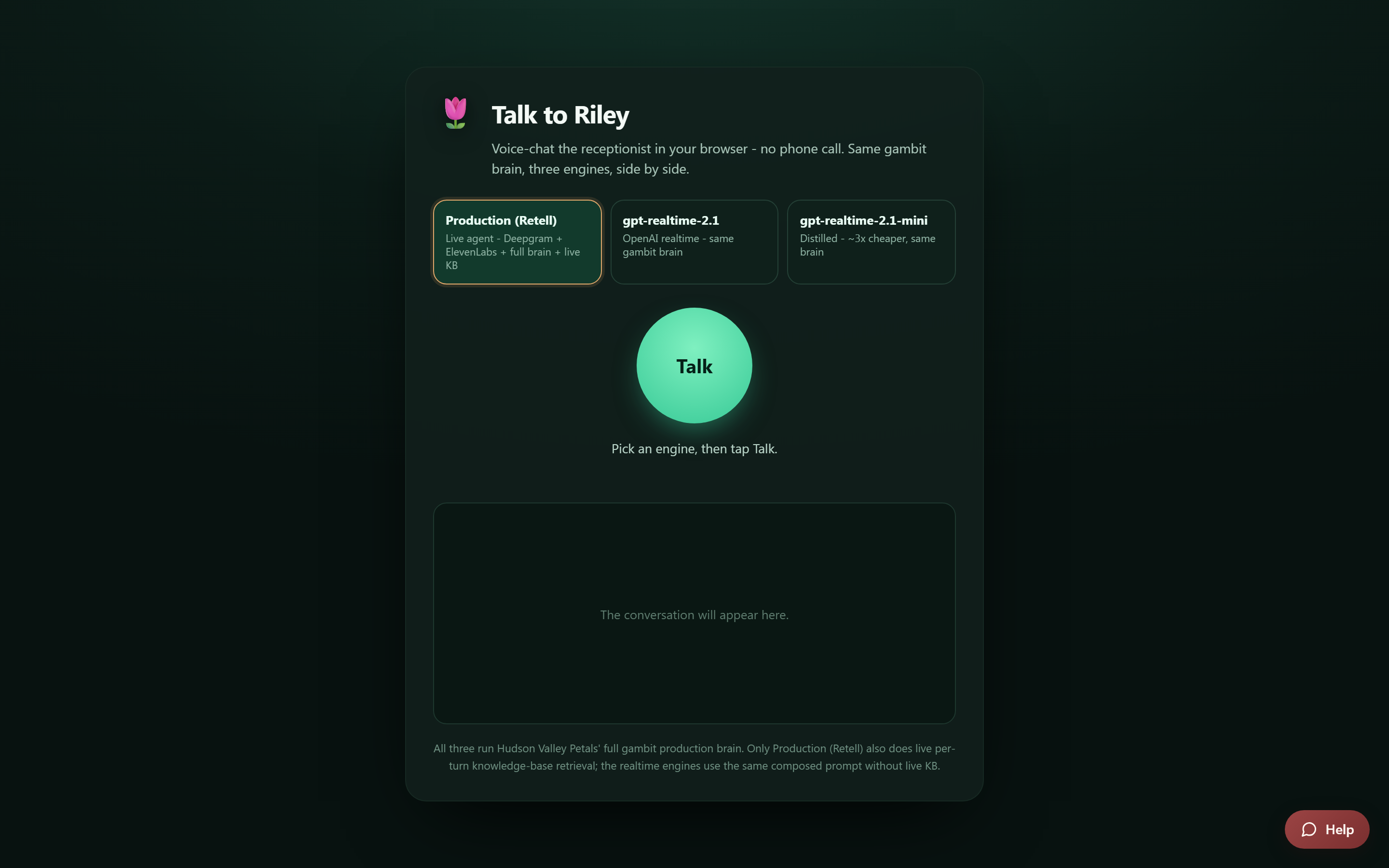
Above the Talk button you will see an engine picker with three options: Production (Retell), gpt-realtime-2.1, and gpt-realtime-2.1-mini. Leave it on Production (Retell) - that is the same engine that answers real shop lines, so it is the truest preview of what your customers would hear. The other two engines exist mainly for internal testing.
Want a guided walkthrough instead?
If you would like a human to walk you through the product, the demo page at km-florist-receptionist.vercel.app/demo lays out a "What we cover" agenda and includes the same live demo phone line, so you can call Riley while you wait. From the home page you can also email us to book a demo or a walkthrough - both email buttons are right in the hero section.
Which option should you pick?
- Two minutes, phone in hand: call the demo line.
- At your desk, headphones on: use the Talk page or play the sample calls.
- Evaluating for your shop and want questions answered: book the walkthrough from the demo page.
Still stuck? Submit a ticket from this help center and we'll take it from there.
Was this article helpful?
That’s Great!
Thank you for your feedback
Sorry! We couldn't be helpful
Thank you for your feedback
Feedback sent
We appreciate your effort and will try to fix the article