If Riley keeps quoting a wrong delivery fee, an old address, or a policy you changed months ago, you can fix it in minutes - no website edit and no recrawl needed. The Knowledge and Patterns tab lets you find the exact knowledge chunk Riley is citing and correct it directly, at https://km-florist-receptionist.vercel.app/dashboard/shop?tab=knowledge.
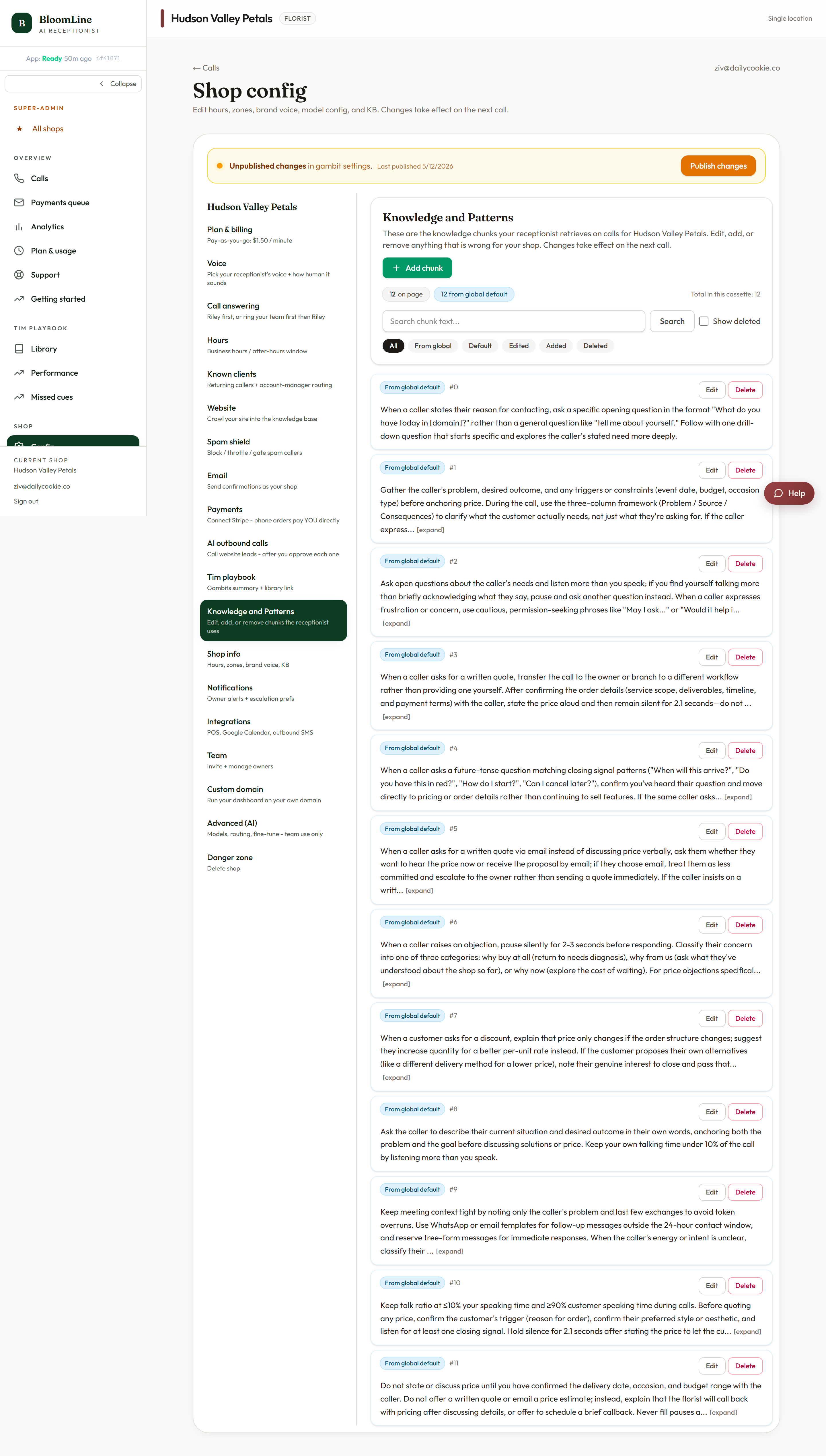
Find and fix the wrong fact
- Open https://km-florist-receptionist.vercel.app/dashboard/shop?tab=knowledge.
- Use the search box to find the chunk containing the wrong fact. Search for the phrase Riley actually says - if it quotes "delivery is $12", search "delivery".
- Click Edit on the chunk. The edit modal opens with the current text.
- Correct the text and save. Your first save creates a shop overlay - your edited copy overrides the original for your shop, so a future recrawl won't clobber your fix.
Add or delete knowledge
- Add knowledge chunk - opens a modal where you write a brand-new fact Riley should know. Great for things that were never on your website.
- Delete chunk - removes a chunk entirely, for facts that are simply no longer true and have no replacement.
What the status chips mean
Each chunk carries a chip so you can see its origin at a glance:
- Default - untouched content from your website crawl.
- Edited - you changed it; your version wins for your shop.
- Added - you created it from scratch.
- Deleted - removed from what Riley can quote.
- From global default - shared baseline knowledge that applies across shops until you override it.
The same editor in the client portal
If you access BloomLine through a client portal, the identical editor lives at /portal/shops/your-shop/knowledge - same search, same modals, same status chips, and the same shop overlay behavior on first save.
Verify the fix
Place a test call from the Opening line studio and ask the question that used to get the wrong answer. If Riley now answers correctly, you are done. If the old fact still comes up, search the knowledge list again - the same fact sometimes appears in more than one chunk, and each copy needs the fix.
Still stuck? Submit a ticket from this help center and we'll take it from there.
Was this article helpful?
That’s Great!
Thank you for your feedback
Sorry! We couldn't be helpful
Thank you for your feedback
Feedback sent
We appreciate your effort and will try to fix the article