Run your shop on Teleflora, RTI, Daisy, or IRIS? Each has its own connector block in the Integrations tab, so the orders Riley takes on the phone can push into your system as web-style orders.
Where the connectors live
- Open Shop config > Integrations in your dashboard.
- Scroll to the block for your system: Teleflora POS, RTI / Daisy, or IRIS.
- Fill in the fields for your system (details below).
- Click Publish changes when the bar appears at the top.
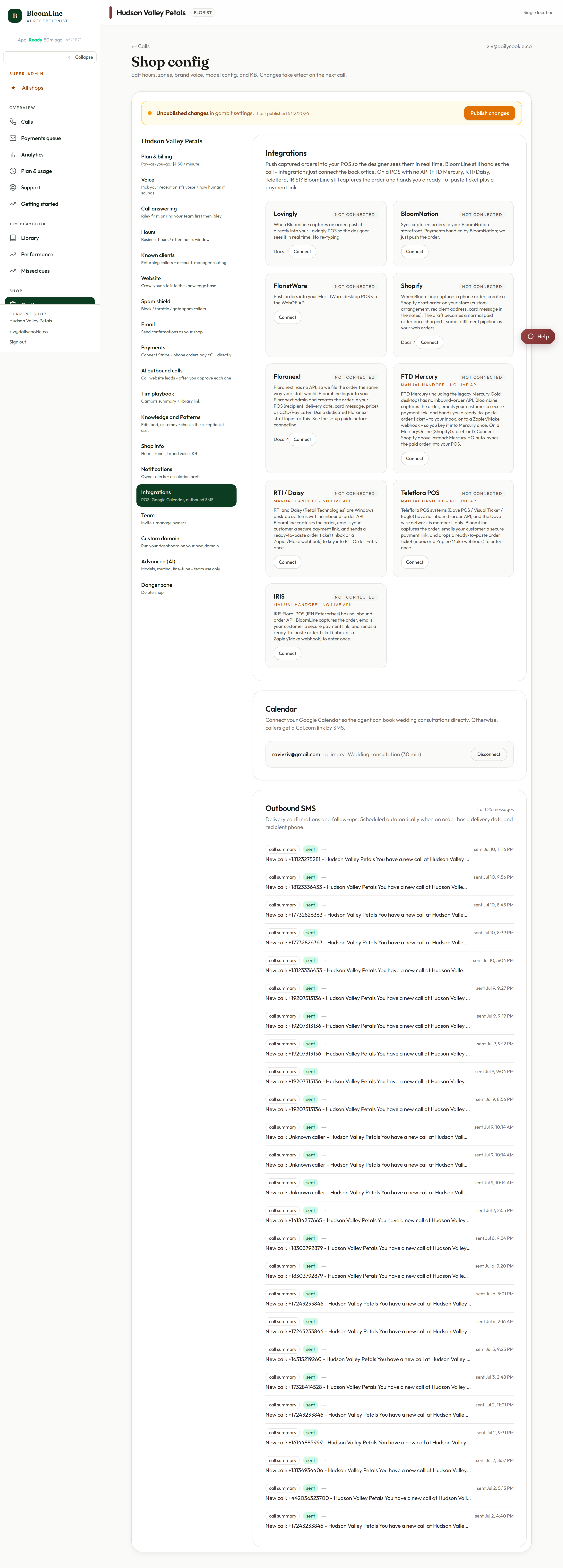
Teleflora POS
The Teleflora block asks for two things:
- Which Teleflora system you run - pick yours from the select.
- An employee ID - phone orders that Riley takes are attributed to this employee inside your Teleflora system. Many shops create a dedicated employee entry (something like "Phone - BloomLine") so it is obvious at a glance which orders came in by phone, and so reporting stays clean.
RTI / Daisy
RTI and Daisy shops share one connector block. Fill in its fields and publish; from then on, phone orders push into your RTI or Daisy system alongside everything else your team fulfills.
IRIS
IRIS has its own connector block on the same tab. Complete its fields, publish, and phone orders start flowing in.
What changes after you connect
- Phone orders show up in your POS as web-style orders - no transcribing from call summaries.
- Your designers keep one queue, whatever channel the order came from.
- With Teleflora, every phone order is attributed to the employee ID you chose, so you can always tell BloomLine orders apart.
If your system version does not match what the connector expects, or you are not sure which fields to use, open a ticket with the name and version of your POS and the team will finish the connection with you.
Still stuck? Submit a ticket from this help center and we'll take it from there.
Was this article helpful?
That’s Great!
Thank you for your feedback
Sorry! We couldn't be helpful
Thank you for your feedback
Feedback sent
We appreciate your effort and will try to fix the article