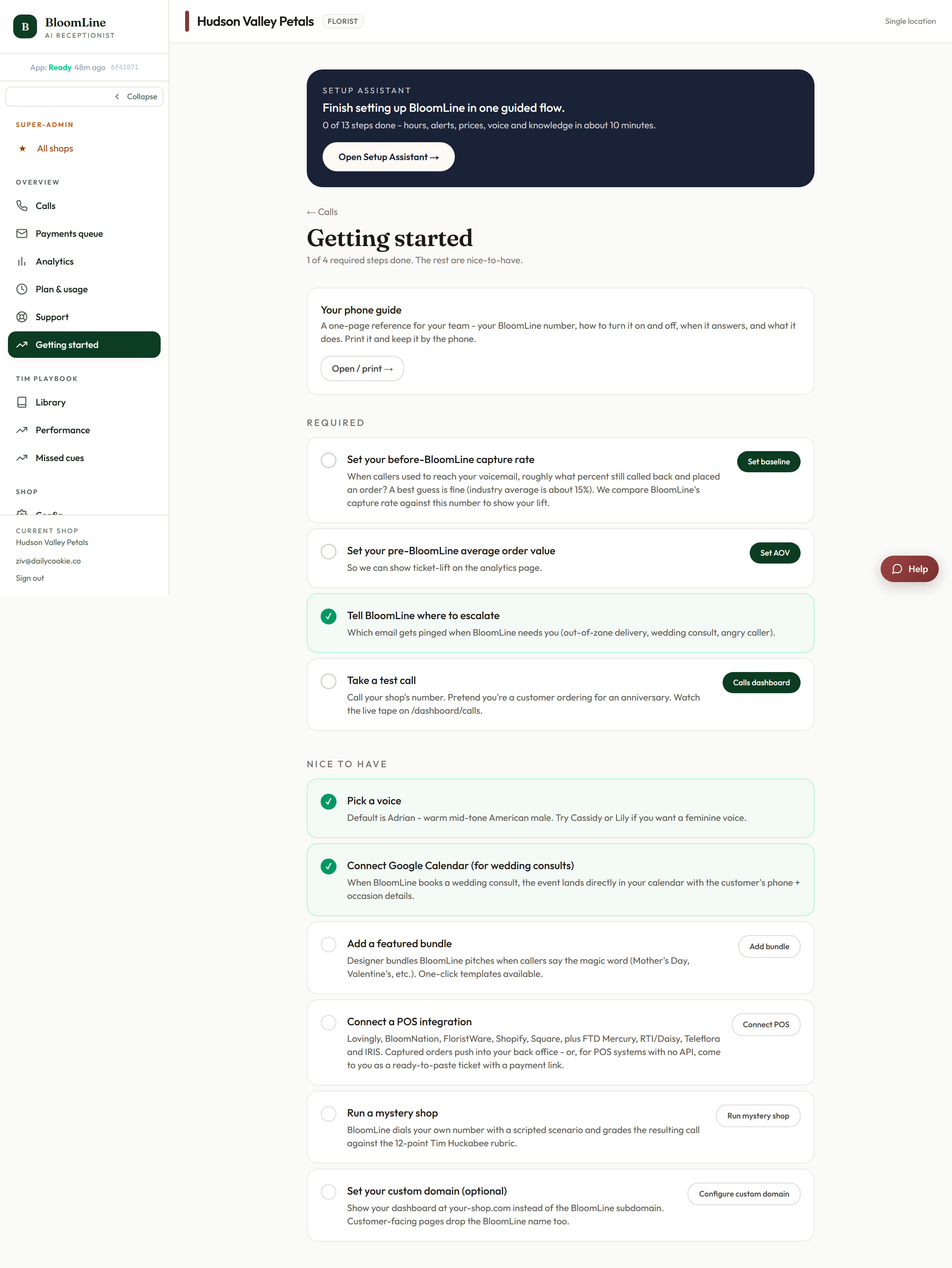
The Getting started page in your dashboard sidebar is a living checklist of everything that makes BloomLine work harder for your shop. The Required group sits at the top - work down that list until your shop is fully live - and the nice-to-have group below it holds the upgrades that sharpen results over time. Every item deep-links straight into the exact setting it refers to, so one click puts you where the work happens.
What's on the checklist
- Set your before-BloomLine capture rate (Set baseline): record what share of calls you were capturing before, so BloomLine can show you what it recovers.
- Set your pre-BloomLine average order value (Set AOV): the second half of the same measurement - together these turn your dashboard numbers into real dollars.
- Tell BloomLine where to escalate (Set notifications): make sure alerts and escalations reach the right person by email or SMS.
- Pick a voice: choose how your receptionist sounds to callers.
- Connect Google Calendar for wedding consults: let consult bookings land on your real calendar.
- Add a featured bundle: give Riley a signature arrangement to offer.
- Connect a POS integration: push phone orders straight into your Shopify, Teleflora, or other order system as web-style orders.
- Take a test call (Calls dashboard): hear Riley yourself and see the call land on the Calls page.
- Run a mystery shop: have an AI tester dial your line and grade Riley on a scored rubric.
- Set your custom domain (optional): run the dashboard on your own domain if you want a white-labeled look.
How to use it
- Open Getting started from the sidebar.
- Start at the top of the Required group and click the first unchecked item - the deep link opens the setting it belongs to.
- Complete the setting, then come back. Items check off as you complete them, so the page always shows how far along you are.
Why the baseline items matter
It is tempting to skip the two measurement items, but they are what make your analytics meaningful. Without a baseline capture rate and a pre-BloomLine average order value, the dashboard cannot show you the before-and-after story of what Riley is recovering for your shop. Two minutes with last month's numbers is all it takes.
When are you "done"?
When the Required group is fully checked, your shop is fully live: Riley answers, you get alerts, and calls flow into the dashboard. The nice-to-have group never really finishes - mystery shops, bundles, and integrations are the items you revisit as your shop grows.
Still stuck? Submit a ticket from this help center and we'll take it from there.
Was this article helpful?
That’s Great!
Thank you for your feedback
Sorry! We couldn't be helpful
Thank you for your feedback
Feedback sent
We appreciate your effort and will try to fix the article