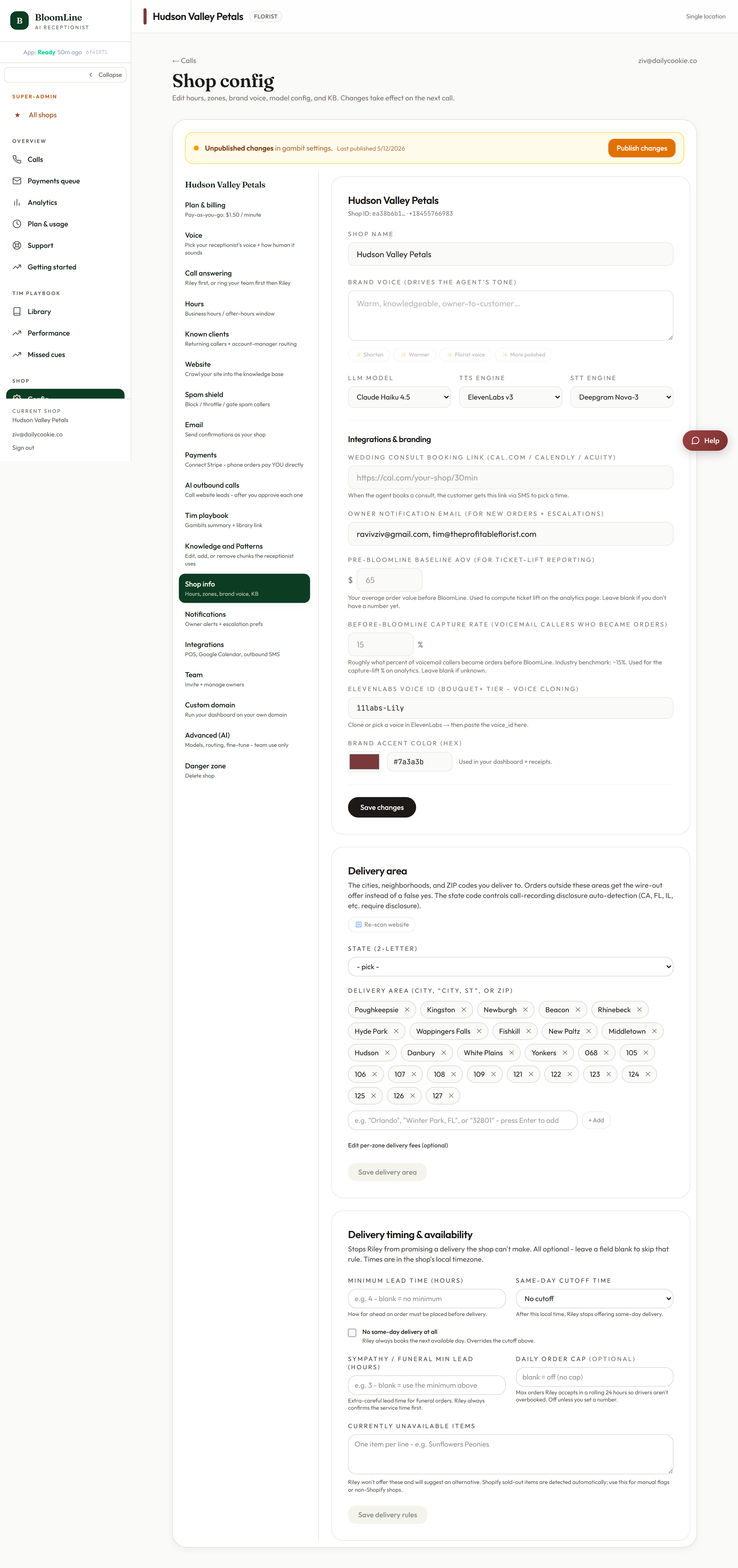
Riley quotes delivery fees, honors your same-day cutoff, and steers callers away from flowers you can't get - but only if you keep the delivery settings current. Everything lives in the Shop info tab at https://km-florist-receptionist.vercel.app/dashboard/shop?tab=info, in two panels: Delivery area and Delivery rules.
Delivery area: zones and fees
- Open https://km-florist-receptionist.vercel.app/dashboard/shop?tab=info and find the Delivery area panel.
- Add or edit zone rows - each zone gets a name and a fee. This is exactly what Riley quotes when a caller asks "how much is delivery to Riverside?".
- If you re-scan your website, a diff preview shows what the scan found versus what you have saved, so you can accept or ignore the changes instead of having them applied silently.
- Click Save delivery area.
Delivery rules: timing, minimums, and caps
The Delivery rules panel controls the promises Riley makes about orders:
- Order minimum - the smallest order you accept for delivery.
- Delivery cutoff - the time after which same-day delivery is no longer promised. Choose No cutoff if you take same-day orders any time.
- Unavailable flowers - a simple list, one flower per line. Anything here is treated as sold out or unstockable, so Riley steers callers toward alternatives instead of promising peonies in November.
- Stem caps - limits on quantities, useful when supply is tight.
Click Save delivery rules when you are done.
Keep the unavailable list alive
The unavailable flowers list is the fastest tool in this tab. Ran out of white roses mid-morning before a funeral order rush? Add "white roses" to the list and save - Riley stops offering them on the very next call. When the delivery truck arrives, remove the line.
How this plays with Money math
If you completed the Setup Assistant's Money math step, you already set a delivery fee and order minimum there - the Shop info tab is where you maintain those numbers day to day, along with the per-zone fees that a single flat number can't express.
Verify
After saving, place a test call and ask for delivery to one of your zones and for a flower on your unavailable list. Riley should quote the right fee and offer an alternative.
Still stuck? Submit a ticket from this help center and we'll take it from there.
Was this article helpful?
That’s Great!
Thank you for your feedback
Sorry! We couldn't be helpful
Thank you for your feedback
Feedback sent
We appreciate your effort and will try to fix the article