The Advanced (AI) tab is the engine room of your receptionist - the model and voice engines behind every call. It exists so the BloomLine team can tune your setup precisely, and it carries a "team use only" warning banner for a reason: a casual change here affects every single call your shop takes. Look, but don't touch unless the BloomLine team has asked you to. It lives at https://km-florist-receptionist.vercel.app/dashboard/shop?tab=advanced.
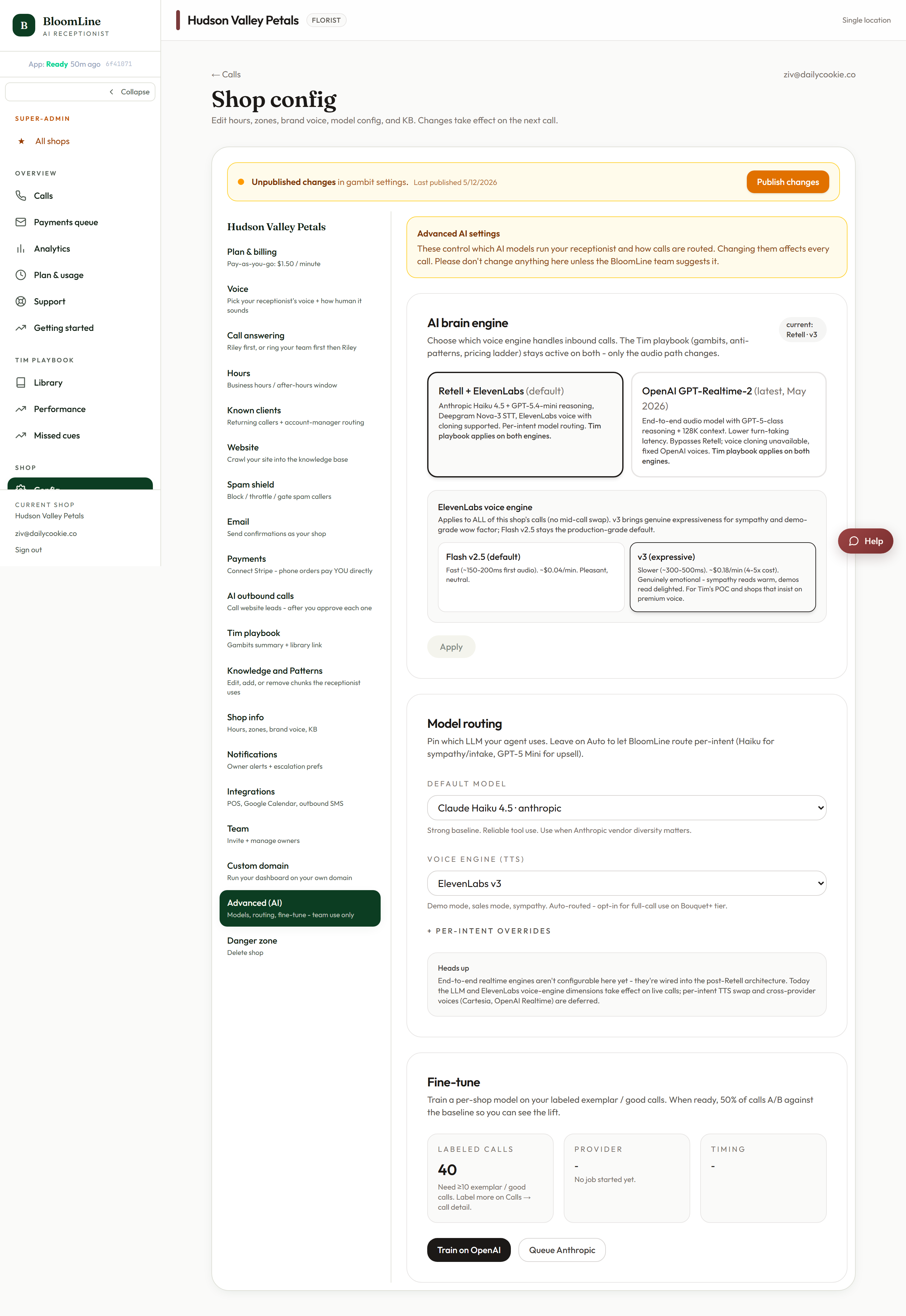
What's in the tab
- AI brain engine + voice select - the underlying conversation engine, with voice options named Alloy, Ash, Ballad, Coral, Echo, Sage, Shimmer, and Verse.
- ElevenLabs voice engine - Flash v2.5 (the default, tuned for speed) or v3 (more expressive delivery).
- Reasoning effort - Low (default), Medium, or High. How much thinking the AI does per response.
- Model routing - the default model select, per-intent Auto overrides (so specific call types can run on specific models), and the Voice engine (TTS) select.
- Fine-tune panel - the status of fine-tuning jobs built from your graded calls: Queued, Training, Ready, Failed, or Paused.
Why hands-off is the right default
The normal voice and persona controls - the Voice tab, the Opening line studio, gambit intensity - are designed for shop owners and safe to experiment with. The Advanced tab is different: engine and routing choices interact with each other and with your fine-tune state in ways that are hard to predict from the labels. A well-meaning switch of the brain engine or reasoning effort can change latency, tone, and behavior across every call at once.
If something about your receptionist feels off, the fix almost always lives elsewhere:
- Sounds wrong? Voice tab (https://km-florist-receptionist.vercel.app/dashboard/shop?tab=brain).
- Says the wrong things? Knowledge and Patterns tab, or the Gambit library.
- Opens badly? Opening line studio.
When you would use it
On BloomLine team advice, typically during a support conversation - "switch the ElevenLabs engine to v3 and tell us if the expressiveness helps". The fine-tune panel is also where you can watch a training run's status move from Queued to Training to Ready after you start one from the Fine-tune page.
If you have changed something here and aren't sure what, open a support ticket and tell us what you touched - we will get you back to a known-good state.
Still stuck? Submit a ticket from this help center and we'll take it from there.
Was this article helpful?
That’s Great!
Thank you for your feedback
Sorry! We couldn't be helpful
Thank you for your feedback
Feedback sent
We appreciate your effort and will try to fix the article