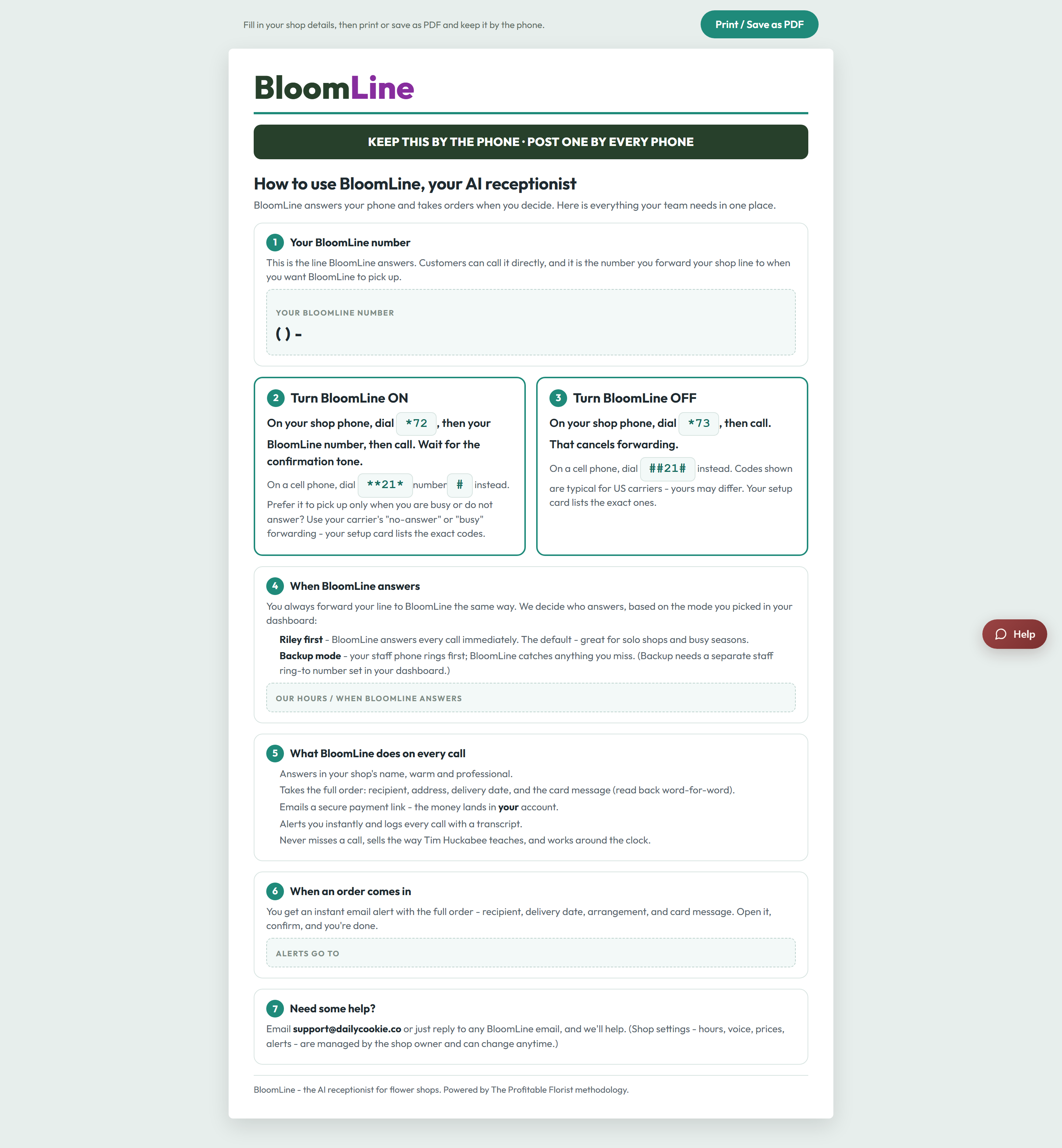
The phone guide is a one-page, printable cheat sheet personalized to your shop - your BloomLine number, your hours, the dial codes to turn call forwarding on and off, and a plain-English rundown of what Riley does on every call. Print it once and anyone behind the counter can manage the phone line without ever opening the dashboard.
What's on the page
- Your BloomLine number: the number your shop line forwards to, printed big enough to read at a glance.
- Your hours: when BloomLine picks up for your shop.
- Forwarding dial codes: the exact codes to switch forwarding on and off from the shop handset. If the internet is down or you want a human-only afternoon, any staff member can dial the off code and flip it back later - no login required.
- What Riley does on every call: a short explanation of how your AI receptionist greets callers, takes orders, and handles requests, so staff can answer customer questions about "who answered the phone."
How to print it
- Sign in and open the phone guide page - it personalizes itself to your shop automatically.
- Use your browser's Print command (Ctrl+P on Windows, Cmd+P on Mac). The page has print styling built in, so it comes out clean on one sheet.
- Prefer a digital copy? Choose "Save as PDF" in the same print dialog and drop it in your shop's shared drive or group chat.
Why it earns its spot by the register
The dashboard is great when you are at a computer, but the moments you need the forwarding codes are exactly the moments you are not: a rush at the counter, a driver at the door, a power blip. A printed guide means:
- Any employee can turn forwarding on or off in seconds, on any shift.
- Nobody has to memorize the BloomLine number or dig for it in email.
- New staff get an instant answer to "what happens when the phone rings?"
Tape it next to the shop phone, and reprint it if your hours or number ever change so the paper copy always matches reality.
Still stuck? Submit a ticket from this help center and we'll take it from there.
Was this article helpful?
That’s Great!
Thank you for your feedback
Sorry! We couldn't be helpful
Thank you for your feedback
Feedback sent
We appreciate your effort and will try to fix the article